Development
- Includes
Debian based, per vscode devcontainer recommended base
Lint: ruff
Formater: black
QoL plugins for vscode
- Added programs
jq
pdm
Setup
You need to have Visual Studio Code a.k.a vscode installed with Remote Development Extension Pack.
Fork this repo
Open the forked project in vscode
You will see this dialog box
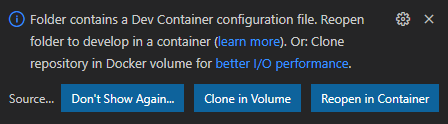
Press Reopen in Container
Now you will ready to start coding. You have all things you need installed. Check Development for what is installed.
Docs
All commands for docs need to run from the docs folder
Docs are written in rst and we are using sphinx to generate all the needed output.
Note
Don’t forget to run make clean when sphinx gets weird
To audobuild html docs when developing
sphinx-autobuild . _build/html/ --watch ../.
# OR use the alias
autobuild-html-docs
Sometimes sphinx-autobuild webserver can be a bit slow use sws insted it’s installed and just run:
./sws --root _build/html/
# OR use the alias
fast-html-docs
It listens on port 80 https://github.com/static-web-server/static-web-server
Intersphinx
Intersphinx is a fantastic tool that enables you to automatic cross-reference and generating links other projects that uses sphinx.
Run docs-helper and use the interactive guide to help with linking
Diagrams
There is support for automatically generating diagrams from text with kroki See https://github.com/sphinx-contrib/kroki for more info
![blockdiag { Kroki -> generates -> "Block diagrams"; Kroki -> is -> "very easy!"; Kroki [color = "greenyellow"]; "Block diagrams" [color = "pink"]; "very easy!" [color = "orange"]; }](_images/kroki-fdc918467cd45210de05b321b1ed71b887b08934.svg)
PDF output
Output to pdf is supported with rinohtype
To build pdf run:
# (cd docs)
sphinx-build -b rinoh . _build/rinoh -t pdf
# OR use the alias
build-pdf